> ## Documentation Index
> Fetch the complete documentation index at: https://social-b97141fb-feat-user-history-moderation-detail.mintlify.site/llms.txt
> Use this file to discover all available pages before exploring further.
# Event
> Comprehensive event management UI components for creating, discovering, and managing scheduled events
**UIKit Component**: Event components are built on top of the social.plus SDK,
providing ready-to-use event creation and discovery UI with full data
management handled automatically.
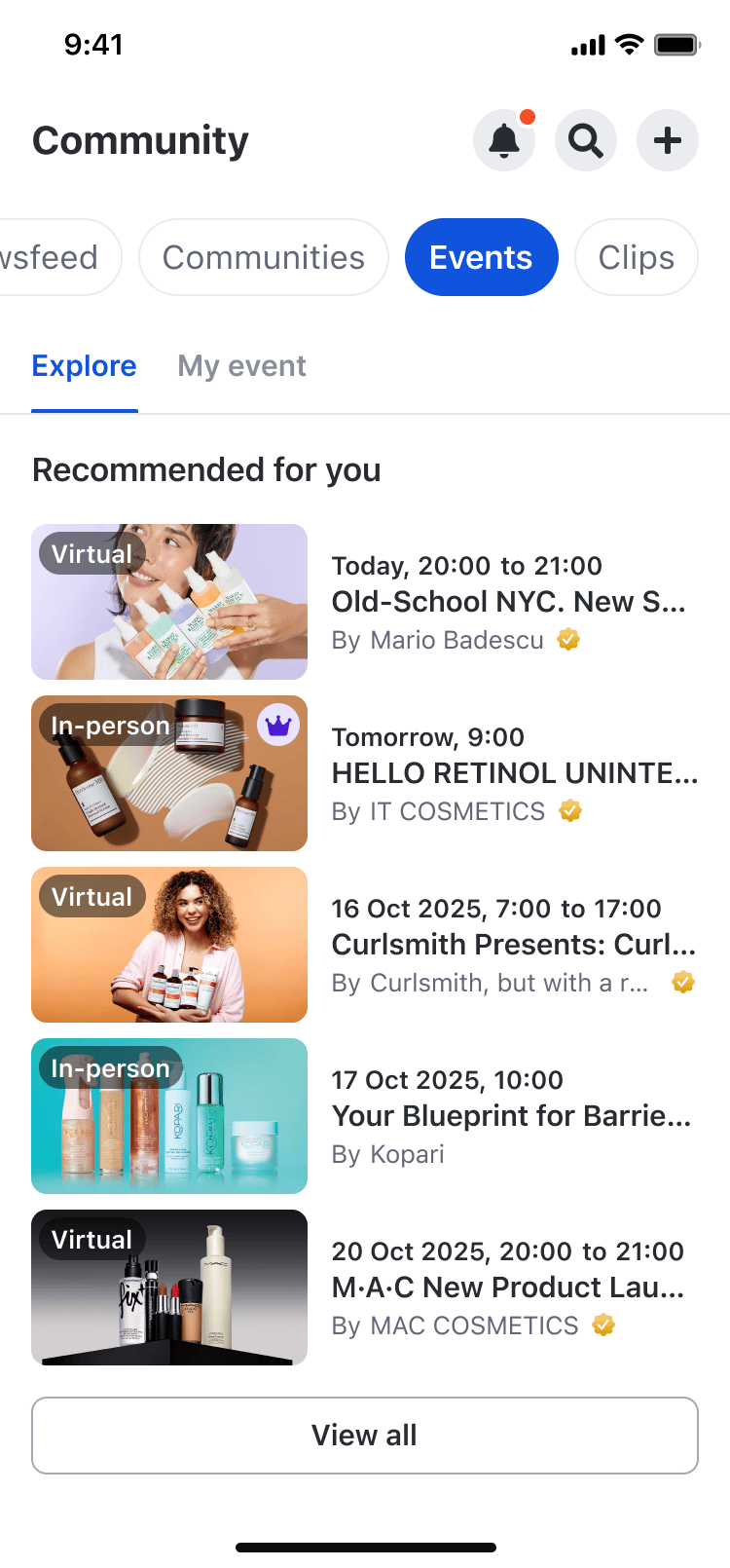 ## Feature Overview
The **Event** feature in social.plus UIKit v4 enables users to create scheduled events, discover upcoming/past events, manage attendees, and navigate between event-related experiences.
### Key Features
**Schedule events with rich details**
* Select where to create the event
* Configure details (name, description, date & time)
* In-person or virtual options
**Explore and manage your events**
* Explore events feed
* Upcoming events page
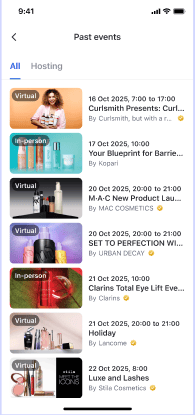
* Past events page
* Community-specific event feed
**Track and manage attendance**
* RSVP (Going/Not going)
* Attendees list
* Reminder Notifications
**Publish an event to a feed**
* Create-post entry point on the event
* Target selection with private-community lock
* Event-post composer with prefilled fields
* Event card in feeds, tap opens event detail
* Read-only pinned / featured badges
### Platform Support
| Feature | iOS | Android | Web | Flutter | React Native |
| - | - | - | - | - | - |
| Event Creation | ✅ | ✅ | ✅ | - | - |
| Event Detail & Attendees | ✅ | ✅ | ✅ | - | - |
| Event discovery | ✅ | ✅ | ✅ | - | - |
| Event in community profile | ✅ | ✅ | ✅ | - | - |
| Event as Post | ✅ | ✅ | ✅ | - | - |
## Permission Handling
The visibility rules for the entry points that trigger event creation are:
1. **Global feed**: Only users with global permission will see the create event button
* Check: `client.hasPermission(AmityPermission.createEvent)`
2. **Community feed**: Users with global OR community permission will see the create event button
* Check: `client.hasPermission(AmityPermission.createEvent, communityId)`
UIKit applies these permission checks automatically. If you implement your own
custom entry points, keep the same permission logic for consistent UX.
## Implementation Guide
### Event Target Selection Page
Use **AmityEventTargetSelectionPage** to choose the destination for the event (Note: community only).
#### Customization Options
| Config ID | Type | Description |
| - | - | - |
| `select_event_target_page/*/*` | Page | Customize page theme |
| `select_event_target_page/*/close_button` | Element | Customize close button image |
| `select_event_target_page/*/title` | Element | Customize page title |
#### Code Examples
```swift iOS theme={null}
let page = AmityEventTargetSelectionPage()
let viewController = AmitySwiftUIHostingController(rootView: page)
navigationController?.pushViewController(viewController, animated: true)
```
```kotlin Android theme={null}
@Composable
fun composeEventTargetSelectionPage() {
AmityEventTargetSelectionPage()
}
// Using Activity
fun startEventTargetSelectionActivity(context: Context) {
val intent = AmityEventTargetSelectionPageActivity.newIntent(
context = context,
)
context.startActivity(intent)
}
```
```typescript React theme={null}
import { AmityUiKitProvider, AmityEventTargetSelectionPage } from '@amityco/ui-kit';
const SampleEventTargetSelectionPage = () => {
return (
);
};
```
### Event Setup Page
Use **AmityEventSetupPage** to create or edit an event.
## Feature Overview
The **Event** feature in social.plus UIKit v4 enables users to create scheduled events, discover upcoming/past events, manage attendees, and navigate between event-related experiences.
### Key Features
**Schedule events with rich details**
* Select where to create the event
* Configure details (name, description, date & time)
* In-person or virtual options
**Explore and manage your events**
* Explore events feed
* Upcoming events page
* Past events page
* Community-specific event feed
**Track and manage attendance**
* RSVP (Going/Not going)
* Attendees list
* Reminder Notifications
**Publish an event to a feed**
* Create-post entry point on the event
* Target selection with private-community lock
* Event-post composer with prefilled fields
* Event card in feeds, tap opens event detail
* Read-only pinned / featured badges
### Platform Support
| Feature | iOS | Android | Web | Flutter | React Native |
| - | - | - | - | - | - |
| Event Creation | ✅ | ✅ | ✅ | - | - |
| Event Detail & Attendees | ✅ | ✅ | ✅ | - | - |
| Event discovery | ✅ | ✅ | ✅ | - | - |
| Event in community profile | ✅ | ✅ | ✅ | - | - |
| Event as Post | ✅ | ✅ | ✅ | - | - |
## Permission Handling
The visibility rules for the entry points that trigger event creation are:
1. **Global feed**: Only users with global permission will see the create event button
* Check: `client.hasPermission(AmityPermission.createEvent)`
2. **Community feed**: Users with global OR community permission will see the create event button
* Check: `client.hasPermission(AmityPermission.createEvent, communityId)`
UIKit applies these permission checks automatically. If you implement your own
custom entry points, keep the same permission logic for consistent UX.
## Implementation Guide
### Event Target Selection Page
Use **AmityEventTargetSelectionPage** to choose the destination for the event (Note: community only).
#### Customization Options
| Config ID | Type | Description |
| - | - | - |
| `select_event_target_page/*/*` | Page | Customize page theme |
| `select_event_target_page/*/close_button` | Element | Customize close button image |
| `select_event_target_page/*/title` | Element | Customize page title |
#### Code Examples
```swift iOS theme={null}
let page = AmityEventTargetSelectionPage()
let viewController = AmitySwiftUIHostingController(rootView: page)
navigationController?.pushViewController(viewController, animated: true)
```
```kotlin Android theme={null}
@Composable
fun composeEventTargetSelectionPage() {
AmityEventTargetSelectionPage()
}
// Using Activity
fun startEventTargetSelectionActivity(context: Context) {
val intent = AmityEventTargetSelectionPageActivity.newIntent(
context = context,
)
context.startActivity(intent)
}
```
```typescript React theme={null}
import { AmityUiKitProvider, AmityEventTargetSelectionPage } from '@amityco/ui-kit';
const SampleEventTargetSelectionPage = () => {
return (
);
};
```
### Event Setup Page
Use **AmityEventSetupPage** to create or edit an event.
.png?fit=max&auto=format&n=EuQgtDswnsuEu3tu&q=85&s=5c8b19344bf9de6c493e1cde4bec27a6) **Public API:**
```swift theme={null}
enum AmityEventSetupPageMode {
case create(targetId, targetName)
case edit(AmityEvent)
}
AmityEventSetupPage(mode: AmityEventSetupPageMode)
```
#### Customization Options
| Config ID | Type | Description |
| - | - | - |
| `event_setup_page/*/*` | Page | Customize page theme |
| `event_setup_page/*/title` | Element | Customize title |
| `event_setup_page/*/camera_button` | Element | Customize camera label/icon |
| `event_setup_page/*/image_button` | Element | Customize photo label/icon |
| `event_setup_page/*/event_name_title` | Element | Customize “Event name” label |
| `event_setup_page/*/event_details_title` | Element | Customize “Event details” label |
| `event_setup_page/*/event_date_time_title` | Element | Customize “Date and time” label |
| `event_setup_page/*/event_location_title` | Element | Customize “Location” label |
#### Code Examples
```swift iOS theme={null}
// Create
let page = AmityEventSetupPage(mode: .create("", ""))
let viewController = AmitySwiftUIHostingController(rootView: page)
navigationController?.pushViewController(viewController, animated: true)
// Edit
// When you already have an AmityEvent object
let editPage = AmityEventSetupPage(mode: .edit(event))
```
```kotlin Android theme={null}
@Composable
fun composeCreateEventSetupPage(targetId: String, targetName: String) {
AmityEventSetupPage(mode = AmityEventSetupPageMode.Create(targetId, targetName))
}
@Composable
fun composeEditEventSetupPage(event: AmityEvent) {
AmityEventSetupPage(mode = AmityEventSetupPageMode.Edit(event))
}
```
```typescript React theme={null}
import { AmityUiKitProvider, AmityEventSetupPage } from '@amityco/ui-kit';
// Create mode
const SampleCreateEventSetupPage = ({ targetId, targetName }) => {
return (
);
};
// Edit mode
const SampleEditEventSetupPage = ({ event }) => {
return (
);
};
```
### Event Detail Page
Use **AmityEventDetailPage** to view event details and access event actions.
**Public API:**
```swift theme={null}
enum AmityEventSetupPageMode {
case create(targetId, targetName)
case edit(AmityEvent)
}
AmityEventSetupPage(mode: AmityEventSetupPageMode)
```
#### Customization Options
| Config ID | Type | Description |
| - | - | - |
| `event_setup_page/*/*` | Page | Customize page theme |
| `event_setup_page/*/title` | Element | Customize title |
| `event_setup_page/*/camera_button` | Element | Customize camera label/icon |
| `event_setup_page/*/image_button` | Element | Customize photo label/icon |
| `event_setup_page/*/event_name_title` | Element | Customize “Event name” label |
| `event_setup_page/*/event_details_title` | Element | Customize “Event details” label |
| `event_setup_page/*/event_date_time_title` | Element | Customize “Date and time” label |
| `event_setup_page/*/event_location_title` | Element | Customize “Location” label |
#### Code Examples
```swift iOS theme={null}
// Create
let page = AmityEventSetupPage(mode: .create("", ""))
let viewController = AmitySwiftUIHostingController(rootView: page)
navigationController?.pushViewController(viewController, animated: true)
// Edit
// When you already have an AmityEvent object
let editPage = AmityEventSetupPage(mode: .edit(event))
```
```kotlin Android theme={null}
@Composable
fun composeCreateEventSetupPage(targetId: String, targetName: String) {
AmityEventSetupPage(mode = AmityEventSetupPageMode.Create(targetId, targetName))
}
@Composable
fun composeEditEventSetupPage(event: AmityEvent) {
AmityEventSetupPage(mode = AmityEventSetupPageMode.Edit(event))
}
```
```typescript React theme={null}
import { AmityUiKitProvider, AmityEventSetupPage } from '@amityco/ui-kit';
// Create mode
const SampleCreateEventSetupPage = ({ targetId, targetName }) => {
return (
);
};
// Edit mode
const SampleEditEventSetupPage = ({ event }) => {
return (
);
};
```
### Event Detail Page
Use **AmityEventDetailPage** to view event details and access event actions.
.png?fit=max&auto=format&n=EuQgtDswnsuEu3tu&q=85&s=ccfaecce7e626d9b4cae2c2595128141) **Public API:**
```swift theme={null}
AmityEventDetailPage(eventId: string)
```
#### Code Examples
```swift iOS theme={null}
let page = AmityEventDetailPage(eventId: "")
let viewController = AmitySwiftUIHostingController(rootView: page)
navigationController?.pushViewController(viewController, animated: true)
```
```kotlin Android theme={null}
@Composable
fun composeEventDetailPage(eventId: String) {
AmityEventDetailPage(eventId = eventId)
}
```
```typescript React theme={null}
import { AmityUiKitProvider, AmityEventDetailPage } from '@amityco/ui-kit';
const SampleEventDetailPage = ({ eventId }) => {
return (
);
};
```
#### Post the event to a feed
The event detail page's 3-dot action menu exposes **Post event to feed**, which starts the event-post creation flow. It appears for Host, Moderator, and Member roles of the event's origin community and is hidden for non-members and visitors.
A **user-hosted** event has no origin community. The full target picker is still available, and it offers the user's own feed plus communities where the user can post. The entry point is shown only when the current user is eligible to publish the event.
| Config ID | Type | Description |
| - | - | - |
| `event_detail_page/*/create_event_post_button` | Element | Customize the "Post event to feed" action label and icon |
Tapping the action always opens `AmityEventPostTargetSelectionPage`. The page chooses its variant from the event's origin:
* **Public-community or user-hosted event** → an open picker with My Timeline and eligible communities. No target is selected automatically.
* **Private-community event** → the same page in its restricted variant, showing only the event's origin community as the valid target.
The destination is overridable through `AmityEventDetailPageBehavior` — see [Behavior Customization](#behavior-customization).
#### Share an event
The event detail page's 3-dot action menu can surface shareable-link actions that open the event directly:
| Action | Platforms | Behavior |
| - | - | - |
| **Copy event link** | iOS, Android, React | Copies the event URL to the clipboard and shows a "Link copied." toast |
| **Share to** | iOS, Android | Opens the native OS share sheet with the event URL (not rendered on Web) |
These actions are backed by the SDK's `Client.getShareableLinkConfiguration()` and appear only when **all** of the following are true:
* Event shareable links are configured for the network — `config.isEnabled(AmitySharableContentType.EVENT)` is `true` (deep link toggle on and an event URL pattern is set in Console).
* The event's origin community is **public**.
* The event is not cancelled and not in a draft/unpublished state.
If any condition fails, the Copy / Share actions are hidden. See [Content Sharing](/social-plus-sdk/social/content-management/content-sharing) for the SDK link-generation API.
Event shareable links are available on iOS, Android, and React (Web). "Share to" (native share sheet) is mobile-only. Refer to the platform UIKit for Flutter and React Native availability.
### Event Attendees Page
Use **AmityEventAttendeesPage** to browse attendees and navigate to a user profile.
**Public API:**
```swift theme={null}
AmityEventAttendeesPage(eventId: string)
```
#### Code Examples
```swift iOS theme={null}
let page = AmityEventAttendeesPage(eventId: "")
let viewController = AmitySwiftUIHostingController(rootView: page)
navigationController?.pushViewController(viewController, animated: true)
```
```kotlin Android theme={null}
@Composable
fun composeEventAttendeesPage(eventId: String) {
AmityEventAttendeesPage(eventId = eventId)
}
```
```typescript React theme={null}
import { AmityUiKitProvider, AmityEventAttendeesPage } from '@amityco/ui-kit';
const SampleEventAttendeesPage = ({ eventId }) => {
return (
);
};
```
### Upcoming Events Pages
Use **AmityUpcomingEventsPage** to browse upcoming events.
**Public API:**
```swift theme={null}
AmityEventDetailPage(eventId: string)
```
#### Code Examples
```swift iOS theme={null}
let page = AmityEventDetailPage(eventId: "")
let viewController = AmitySwiftUIHostingController(rootView: page)
navigationController?.pushViewController(viewController, animated: true)
```
```kotlin Android theme={null}
@Composable
fun composeEventDetailPage(eventId: String) {
AmityEventDetailPage(eventId = eventId)
}
```
```typescript React theme={null}
import { AmityUiKitProvider, AmityEventDetailPage } from '@amityco/ui-kit';
const SampleEventDetailPage = ({ eventId }) => {
return (
);
};
```
#### Post the event to a feed
The event detail page's 3-dot action menu exposes **Post event to feed**, which starts the event-post creation flow. It appears for Host, Moderator, and Member roles of the event's origin community and is hidden for non-members and visitors.
A **user-hosted** event has no origin community. The full target picker is still available, and it offers the user's own feed plus communities where the user can post. The entry point is shown only when the current user is eligible to publish the event.
| Config ID | Type | Description |
| - | - | - |
| `event_detail_page/*/create_event_post_button` | Element | Customize the "Post event to feed" action label and icon |
Tapping the action always opens `AmityEventPostTargetSelectionPage`. The page chooses its variant from the event's origin:
* **Public-community or user-hosted event** → an open picker with My Timeline and eligible communities. No target is selected automatically.
* **Private-community event** → the same page in its restricted variant, showing only the event's origin community as the valid target.
The destination is overridable through `AmityEventDetailPageBehavior` — see [Behavior Customization](#behavior-customization).
#### Share an event
The event detail page's 3-dot action menu can surface shareable-link actions that open the event directly:
| Action | Platforms | Behavior |
| - | - | - |
| **Copy event link** | iOS, Android, React | Copies the event URL to the clipboard and shows a "Link copied." toast |
| **Share to** | iOS, Android | Opens the native OS share sheet with the event URL (not rendered on Web) |
These actions are backed by the SDK's `Client.getShareableLinkConfiguration()` and appear only when **all** of the following are true:
* Event shareable links are configured for the network — `config.isEnabled(AmitySharableContentType.EVENT)` is `true` (deep link toggle on and an event URL pattern is set in Console).
* The event's origin community is **public**.
* The event is not cancelled and not in a draft/unpublished state.
If any condition fails, the Copy / Share actions are hidden. See [Content Sharing](/social-plus-sdk/social/content-management/content-sharing) for the SDK link-generation API.
Event shareable links are available on iOS, Android, and React (Web). "Share to" (native share sheet) is mobile-only. Refer to the platform UIKit for Flutter and React Native availability.
### Event Attendees Page
Use **AmityEventAttendeesPage** to browse attendees and navigate to a user profile.
**Public API:**
```swift theme={null}
AmityEventAttendeesPage(eventId: string)
```
#### Code Examples
```swift iOS theme={null}
let page = AmityEventAttendeesPage(eventId: "")
let viewController = AmitySwiftUIHostingController(rootView: page)
navigationController?.pushViewController(viewController, animated: true)
```
```kotlin Android theme={null}
@Composable
fun composeEventAttendeesPage(eventId: String) {
AmityEventAttendeesPage(eventId = eventId)
}
```
```typescript React theme={null}
import { AmityUiKitProvider, AmityEventAttendeesPage } from '@amityco/ui-kit';
const SampleEventAttendeesPage = ({ eventId }) => {
return (
);
};
```
### Upcoming Events Pages
Use **AmityUpcomingEventsPage** to browse upcoming events.
.png?fit=max&auto=format&n=NVLFFvDF9Y1lT-Cj&q=85&s=87ca5511459237be5ffe3e49f9a6ab24) #### Customization Options
| Config ID | Type | Description |
| - | - | - |
| `upcoming_events_page/*/*` | Page | Customize upcoming events page |
#### Code Examples
```swift iOS theme={null}
// Show all upcoming events (Explore mode)
let upcomingEventsPage = AmityUpcomingEventsPage(
context: .init(onlyMyEvents: false)
)
let viewController = AmitySwiftUIHostingController(rootView: upcomingEventsPage)
navigationController?.pushViewController(viewController, animated: true)
// Show only user's upcoming events (My Events mode)
let myEventsPage = AmityUpcomingEventsPage(
context: .init(onlyMyEvents: true)
)
let myEventsViewController = AmitySwiftUIHostingController(rootView: myEventsPage)
navigationController?.pushViewController(myEventsViewController, animated: true)
```
```kotlin Android theme={null}
// Using Activity - All events
fun startUpcomingEventsActivityAllEvents(context: Context) {
val intent = AmityUpcomingEventsPageActivity.newIntent(
context = context,
showAllEvents = true
)
context.startActivity(intent)
}
// Using Activity - My events only
fun startUpcomingEventsActivityMyEvents(context: Context) {
val intent = AmityUpcomingEventsPageActivity.newIntent(
context = context,
showAllEvents = false
)
context.startActivity(intent)
}
```
```typescript React theme={null}
import { AmityUiKitProvider, AmityUpcomingEventsPage } from '@amityco/ui-kit';
const SampleAmityUpcomingEventsPage = () => {
return (
);
};
```
### Past Events Page
Use **AmityPastEventsPage** to browse past events.
#### Customization Options
| Config ID | Type | Description |
| - | - | - |
| `upcoming_events_page/*/*` | Page | Customize upcoming events page |
#### Code Examples
```swift iOS theme={null}
// Show all upcoming events (Explore mode)
let upcomingEventsPage = AmityUpcomingEventsPage(
context: .init(onlyMyEvents: false)
)
let viewController = AmitySwiftUIHostingController(rootView: upcomingEventsPage)
navigationController?.pushViewController(viewController, animated: true)
// Show only user's upcoming events (My Events mode)
let myEventsPage = AmityUpcomingEventsPage(
context: .init(onlyMyEvents: true)
)
let myEventsViewController = AmitySwiftUIHostingController(rootView: myEventsPage)
navigationController?.pushViewController(myEventsViewController, animated: true)
```
```kotlin Android theme={null}
// Using Activity - All events
fun startUpcomingEventsActivityAllEvents(context: Context) {
val intent = AmityUpcomingEventsPageActivity.newIntent(
context = context,
showAllEvents = true
)
context.startActivity(intent)
}
// Using Activity - My events only
fun startUpcomingEventsActivityMyEvents(context: Context) {
val intent = AmityUpcomingEventsPageActivity.newIntent(
context = context,
showAllEvents = false
)
context.startActivity(intent)
}
```
```typescript React theme={null}
import { AmityUiKitProvider, AmityUpcomingEventsPage } from '@amityco/ui-kit';
const SampleAmityUpcomingEventsPage = () => {
return (
);
};
```
### Past Events Page
Use **AmityPastEventsPage** to browse past events.
 #### Customization Options
| Config ID | Type | Description |
| - | - | - |
| `past_events_page/*/*` | Page | Customize past events page |
#### Code Examples
```swift iOS theme={null}
// Show past events page
let pastEventsPage = AmityPastEventsPage()
let viewController = AmitySwiftUIHostingController(rootView: pastEventsPage)
navigationController?.pushViewController(viewController, animated: true)
```
```kotlin Android theme={null}
// Using Activity - All events
fun startPastEventsActivityAllEvents(context: Context) {
val intent = AmityPastEventsPageActivity.newIntent(context)
context.startActivity(intent)
}
// Using Activity - My events only
fun startPastEventsActivityMyEvents(context: Context) {
val intent = AmityPastEventsPageActivity.newIntent(context)
context.startActivity(intent)
}
```
```typescript React theme={null}
import { AmityUiKitProvider, AmityPastEventsPage } from '@amityco/ui-kit';
const SampleAmityPastEventsPageActivityPage = () => {
return (
);
};
```
### Feed Components
**Event discovery surfaces embedded in existing feature pages**
The Event feature integrates with these components:
* **AmityExploreEventFeedComponent**
* **AmityMyEventFeedComponent**
* **AmityEventInfoComponent**
* **AmityEventDiscussionFeedComponent**
These components are typically used inside existing UIKit pages (e.g., Social Home and Community Profile). If you’re using the standard Social Home experience, you get these feeds automatically.
The **Explore** and **Happening now** discovery feeds exclude events created by the current user, so people only see events from others when browsing. This is handled automatically by the UIKit — no configuration required.
#### Code Examples
#### AmityExploreEventFeedComponent
```swift iOS theme={null}
// Show explore event feed component
let exploreEventComponent = AmityExploreEventFeedComponent(pageId: .socialHomePage)
let viewController = AmitySwiftUIHostingController(rootView: exploreEventComponent)
navigationController?.pushViewController(viewController, animated: true)
```
```kotlin Android theme={null}
@Composable
fun composeExploreEventFeed() {
// Get flows directly from SDK repository
val liveEvents = remember {
AmitySocialClient.newEventRepository()
.getLiveEvents()
.cachedIn(viewModelScope)
}.collectAsLazyPagingItems()
val upcomingEvents = remember {
AmitySocialClient.newEventRepository()
.getUpcomingEvents()
.cachedIn(viewModelScope)
}.collectAsLazyPagingItems()
AmityExploreEventFeedComponent(
liveEvents = liveEvents,
upcomingEvents = upcomingEvents
)
}
```
```typescript React theme={null}
import { AmityUiKitProvider, AmityExploreEventFeedComponent } from '@amityco/ui-kit';
const SampleAmityExploreEventFeedComponent = () => {
return (
);
};
```
#### AmityMyEventFeedComponent
```swift iOS theme={null}
// Show my event feed component
let myEventComponent = AmityMyEventFeedComponent(pageId: .socialHomePage)
let viewController = AmitySwiftUIHostingController(rootView: myEventComponent)
navigationController?.pushViewController(viewController, animated: true)
```
```kotlin Android theme={null}
@Composable
fun composeMyEventFeed() {
// Get flows directly from SDK repository
val liveEvents = remember {
AmitySocialClient.newEventRepository()
.getLiveEvents()
.cachedIn(viewModelScope)
}.collectAsLazyPagingItems()
val upcomingEvents = remember {
AmitySocialClient.newEventRepository()
.getMyUpcomingEvents()
.cachedIn(viewModelScope)
}.collectAsLazyPagingItems()
val pastEvents = remember {
AmitySocialClient.newEventRepository()
.getPastEvents()
.cachedIn(viewModelScope)
}.collectAsLazyPagingItems()
AmityMyEventFeedComponent(
liveEvents = liveEvents,
upcomingEvents = upcomingEvents,
pastEvents = pastEvents
)
}
```
```typescript React theme={null}
import { AmityUiKitProvider, AmityMyEventFeedComponent } from '@amityco/ui-kit';
const SampleAmityMyEventFeedComponent = () => {
return (
);
};
```
#### AmityEventInfoComponent
```swift iOS theme={null}
let eventDetailViewModel = AmityEventDetailPageViewModel(event: event)
let eventInfoComponent = AmityEventInfoComponent(viewModel: eventDetailViewModel)
let viewController = AmitySwiftUIHostingController(rootView: eventInfoComponent)
navigationController?.pushViewController(viewController, animated: true)
```
```kotlin Android theme={null}
@Composable
fun composeEventInfo(
event: AmityEvent
) {
AmityEventInfoComponent(
event = event
)
}
```
```typescript React theme={null}
import { AmityUiKitProvider, AmityEventInfoComponent } from '@amityco/ui-kit';
const SampleAmityEventInfoComponent = ({ event }) => {
return (
);
};
```
#### AmityEventDiscussionFeedComponent
```swift iOS theme={null}
// Show event discussion feed component (requires an event and view model)
let eventDetailViewModel = AmityEventDetailPageViewModel(event: event)
let discussionFeedComponent = AmityEventDiscussionFeedComponent(viewModel: eventDetailViewModel)
let viewController = AmitySwiftUIHostingController(rootView: discussionFeedComponent)
navigationController?.pushViewController(viewController, animated: true)
```
```kotlin Android theme={null}
@Composable
fun composeEventDiscussionFeed(
eventId: String
) {
val viewModel: AmityEventDetailViewModel = viewModel()
val lazyListState = rememberLazyListState()
LaunchedEffect(eventId) {
viewModel.loadEvent(eventId)
}
AmityEventDiscussionFeedComponent(
viewModel = viewModel,
lazyListState = lazyListState,
shouldRefresh = false,
header = {
item {
Text("Event Discussion Header")
}
}
)
}
```
```typescript React theme={null}
import { AmityUiKitProvider, AmityEventDiscussionFeedComponent } from '@amityco/ui-kit';
const SampleAmityEventDiscussionFeedComponent = ({ event }) => {
return (
);
};
```
#### Customization Options
| Config ID | Type | Description |
| - | - | - |
| `social_home_page/my_event_feed_component/*` | Component | Customize My Event feed section |
| `social_home_page/explore_event_feed_component/*` | Component | Customize Explore Event feed section |
| `community_profile_page/*/create_event_button` | Element | Customize create event button label |
| `social_home_page/create_post_menu/create_event_button` | Element | Customize create-event entry in create-post menu |
If you need to hook navigation (e.g., “View all upcoming”), use the corresponding Behavior class documented in the next tab.
Any event can be published as a post so it renders as an **event card** inside a feed. The post carries the author's text and the event supplies the card; tapping the card opens the event detail page rather than a generic post detail view. The SDK contract is documented in [Event Posts](/social-plus-sdk/social/content-management/posts/creation/event-post).
### Flow
1. Host / Moderator / Member taps **Post event to feed** in the event detail 3-dot menu.
2. `AmityEventPostTargetSelectionPage` shows the target choices. For a private-community event, it shows only the origin community; for other events, it shows My Timeline and eligible communities.
3. `AmityPostComposerPage` opens in event-post mode with the title and body prefilled from the event.
4. The user optionally edits the text, then publishes. The post appears in the target feed as an event card.
#### Post-creation prompt
There is a second entry point into the same flow. Immediately after a host creates an event, a modal bottom sheet prompts them to publish it — "Your event was created successfully" / "Post it to a feed so more people can find and join", with **Post to feed** and **Maybe later** actions. **Post to feed** enters the flow at step 2.
This sheet **replaces** the usual "event created" toast for the host, so it changes the existing create-event flow, not just the event-post flow. It is shown once per creation.
### AmityEventPostTargetSelectionPage
Use **AmityEventPostTargetSelectionPage** to pick where the event post is published. It has two variants driven by the event's origin:
* **Full variant** (public-community or user-hosted event) — the "My Timeline" row plus the paginated list of communities the user can post in. No target is preselected; the user chooses one.
* **Restricted variant** (private-community event) — a banner explains the lock and a single row shows the event's origin community with a `Private` badge. The user cannot pick any other target.
**Public API:**
```swift theme={null}
AmityEventPostTargetSelectionPage(event: AmityEvent)
```
#### Customization Options
Android and Web use event-specific configuration keys. iOS uses the shared post-target-selection page identifier because the event-post page reuses the normal post-target-selection configuration.
| Config ID | Platforms | Type | Description |
| - | - | - | - |
| `event_post_target_selection_page/*/*` | Android, Web | Page | Customize page theme |
| `event_post_target_selection_page/*/title` | Android, Web | Element | Customize page title |
| `event_post_target_selection_page/*/close_button` | Android, Web | Element | Customize close button image |
| `select_post_target_page/*/*` | iOS | Page | Customize page theme |
| `select_post_target_page/*/title` | iOS | Element | Customize page title |
| `select_post_target_page/*/close_button` | iOS | Element | Customize close button image |
#### Code Examples
```swift iOS theme={null}
let page = AmityEventPostTargetSelectionPage(event: event)
let viewController = AmitySwiftUIHostingController(rootView: page)
navigationController?.pushViewController(viewController, animated: true)
```
```kotlin Android theme={null}
@Composable
fun composeEventPostTargetSelectionPage(event: AmityEvent) {
AmityEventPostTargetSelectionPage(event = event)
}
// Or launch the activity directly:
val intent = AmityEventPostTargetSelectionPageActivity.newIntent(
context = context,
event = event,
)
context.startActivity(intent)
```
```typescript React theme={null}
import { AmityUiKitProvider, AmityEventPostTargetSelectionPage } from '@amityco/ui-kit';
const SampleAmityEventPostTargetSelectionPage = ({ event }) => {
return (
);
};
```
### Composer in Event-Post Mode
`AmityPostComposerPage` accepts an event-post mode that prefills fields from the event and disables inputs that the backend rejects for event posts.
**Prefill (one-time copy, editable):**
| Composer field | Source |
| - | - |
| Title | `event.title` |
| Body | `event.description` |
Clearing both fields still publishes — the event card is the payload.
**Unavailable in event-post mode:**
* Media attachments (image / video / file / audio / clip)
* Product tags
* URL link-preview card (URLs still autolink inside the body)
* Detach or swap event — the event reference is immutable
**Public API:**
iOS and Web add a dedicated composer mode:
```swift theme={null}
public enum AmityPostComposerOptions {
case createOptions(mode, targetId, targetType, community?, event?)
case editOptions(mode, post)
case createEventPostOptions(event, targetId, targetType)
}
AmityPostComposerPage(options: AmityPostComposerOptions)
```
On iOS the private-community target lock is applied upstream on `AmityEventPostTargetSelectionPage` (which decides `targetId` before the composer opens), so `createEventPostOptions` has no `isTargetLocked` parameter.
Android has no separate mode. The existing create options carry optional event parameters, and the composer switches into event-post mode when `attachedEventId` is set. Note that it takes an **event ID**, not an `AmityEvent`, and has no `isTargetLocked` — on Android the lock is applied upstream on the target-selection page.
```kotlin theme={null}
AmityPostComposerOptions.AmityPostComposerCreateOptions(
targetId: String?,
targetType: AmityPostTargetType,
community: AmityCommunity?,
attachedEventId: String?,
prefilledTitle: String?,
prefilledBody: String?,
)
AmityPostComposerPage(options: AmityPostComposerOptions)
```
#### Code Examples
```swift iOS theme={null}
let options = AmityPostComposerOptions.createEventPostOptions(
event: event,
targetId: targetId,
targetType: .community
)
let page = AmityPostComposerPage(options: options)
let viewController = AmitySwiftUIHostingController(rootView: page)
navigationController?.pushViewController(viewController, animated: true)
```
```kotlin Android theme={null}
@Composable
fun composeCreateEventPost(
event: AmityEvent,
targetId: String,
targetType: AmityPostTargetType,
community: AmityCommunity?,
) {
AmityPostComposerPage(
options = AmityPostComposerOptions.AmityPostComposerCreateOptions(
targetId = targetId,
targetType = targetType,
community = community,
attachedEventId = event.getEventId(),
prefilledTitle = event.getTitle(),
prefilledBody = event.getDescription(),
)
)
}
```
```typescript React theme={null}
import { AmityUiKitProvider, AmityPostComposerPage } from '@amityco/ui-kit';
const SampleCreateEventPost = ({ event, targetId, targetType, isTargetLocked }) => {
return (
);
};
```
### Editing an Event Post
Editing an event post uses `AmityPostComposerPage` in `edit` mode. Only `data.title` and `data.text` are editable — the event reference is immutable, and the event itself is never modified from the post.
If the referenced event has been deleted, the composer still opens and text edits still save; the embedded event card renders its deleted state. A **cancelled** event is treated identically to a deleted one.
### Event Post in Feeds
`AmityPostContentComponent` renders an event card whenever a post's `dataType` is `event`. The event card reuses the existing `EventCard` component — no new element is introduced.
**Card states:**
| State | Behavior |
| - | - |
| Resolved | Cover image, start–end time, title, "By {host}". Tapping the card navigates to the event detail page. |
| Loading | Skeleton while the event resolves; not tappable. |
| Deleted | Shows "This event is no longer available." The card is non-interactive; only the resolved card navigates. Comments and reactions on the post survive. |
A **cancelled** event and an event missing from the payload both normalise into the deleted state — there is no separate cancelled treatment.
**Tap-through:**
The tap-through behavior differs from other post types:
| Region tapped | Destination |
| - | - |
| Event card | Event detail page, via `AmityPostContentComponentBehavior.goToEventDetailPage` |
| Header / author avatar | Author profile (default) |
| Caption text | Post detail (default) |
| Engagement bar | Post detail with comments (default) |
| 3-dot menu | Action sheet (default) |
**Pinned / featured badges are read-only in UIKit.** The badge renders whenever a post is pinned or featured, but there is no in-app control to change that state — the control lives in the Console. See the [Console note on pin/feature](/social-plus-sdk/social/content-management/posts/moderation/pin-post) for details.
A post published to a user's own feed can never be pinned. Global featuring requires a public community.
## Customization
UIKit provides these customization keys for event entry points and pages.
```json theme={null}
{
"*/community_sidebar/communities_sidebar_menu_item": {
"text": "Communities",
"icon": ""
},
"*/community_sidebar/events_sidebar_menu_item": {
"text": "Events",
"icon": ""
},
"social_home_page/*/communities_button": {
"text": "Communities"
},
"social_home_page/*/events_button": {
"text": "Events"
},
"social_home_page/create_post_menu/create_event_button": {
"text": "Event",
"image": ""
},
"social_home_page/my_event_feed_component/*": {},
"social_home_page/explore_event_feed_component/*": {},
"community_profile_page/*/create_event_button": {
"text": "Event"
},
"select_event_target_page/*/*": {},
"select_event_target_page/*/close_button": {
"image": ""
},
"select_event_target_page/*/title": {
"text": "Create event in"
},
"event_setup_page/*/*": {},
"event_setup_page/*/title": {
"text": "Create event"
},
"event_setup_page/*/camera_button": {
"text": "Camera",
"image": ""
},
"event_setup_page/*/image_button": {
"text": "Photo",
"image": ""
},
"event_setup_page/*/event_name_title": {
"text": "Event name"
},
"event_setup_page/*/event_details_title": {
"text": "Event details"
},
"event_setup_page/*/event_date_time_title": {
"text": "Date and time"
},
"event_setup_page/*/event_location_title": {
"text": "Location"
},
"upcoming_events_page/*/*": {},
"past_events_page/*/*": {},
"event_detail_page/*/create_event_post_button": {
"text": "Post event to feed",
"image": ""
},
"event_post_target_selection_page/*/*": {},
"event_post_target_selection_page/*/title": {
"text": "Post to"
},
"event_post_target_selection_page/*/close_button": {
"image": ""
},
"select_post_target_page/*/*": {},
"select_post_target_page/*/title": {
"text": "Post to"
},
"select_post_target_page/*/close_button": {
"image": ""
}
}
```
## Behavior Customization
UIKit provides behavior classes to customize navigation and actions for event-related pages and components.
### Page Behaviors
```swift theme={null}
class AmityEventTargetSelectionPageBehavior {
goToEventSetupPage(context): void {
// navigation logic
}
}
```
```swift theme={null}
class AmityEventSetupPageBehavior {
goToEventDetailPage(context): void {
// navigation logic
}
}
```
```swift theme={null}
class AmityEventDetailPageBehavior {
goToEventSetupPage(context): void {
// navigation logic
}
goToLivestreamPostComposerPage(context): void {
// navigation logic
}
goToPostDetailPage(context): void {
// navigation logic
}
goToPostComposerPage(context): void {
// navigation logic — used for private-community events (target locked)
}
goToPollPostComposerPage(context): void {
// navigation logic
}
goToEventPostTargetSelectionPage(context): void {
// navigation logic — used for public-community / user-hosted events
}
goToCommunityProfilePage(context): void {
// navigation logic
}
goToEventAttendeesPage(context): void {
// navigation logic
}
}
```
```swift theme={null}
class AmityEventPostTargetSelectionPageBehavior {
goToPostComposerPage(context): void {
// navigation logic — opens composer in event-post mode with the resolved target
}
}
```
```swift theme={null}
class AmityEventAttendeesPageBehavior {
goToUserProfilePage(context): void {
// navigation logic
}
}
```
```swift theme={null}
class AmityNotificationTrayPageBehavior {
// ... existing behaviors
goToEventDetailPage(context): void {
// navigation logic
}
}
```
```swift theme={null}
class AmityCommunityProfilePageBehavior {
// ... existing behaviors
goToEventDetailPage(context): void {
// navigation logic
}
}
```
### Component Behaviors
```swift theme={null}
class AmityExploreEventFeedComponentBehavior {
goToUpcomingEventsPage(context): void {
// navigation logic
}
}
```
```swift theme={null}
class AmityMyEventFeedComponentBehavior {
goToUpcomingEventsPage(context): void {
// navigation logic
}
goToPastEventsPage(context): void {
// navigation logic
}
}
```
```swift theme={null}
class AmityCreatePostMenuComponentBehavior {
// ... existing behaviors
goToSelectEventTargetPage(): void {
// navigation logic
}
}
```
```swift theme={null}
class AmityPostContentComponentBehavior {
// ... existing behaviors
goToEventDetailPage(context): void {
// navigation logic — invoked when the event card region of an event post is tapped
}
}
```
```swift theme={null}
class AmityMyCommunitiesComponentBehavior {
// ... existing behaviors
goToCommunitySetupPage(): void {
// navigation logic
}
}
```
## Related Topics
SDK event APIs and data models
Community UI components
Livestream UI components
This documentation is built and hosted on [Mintlify](https://mintlify.com), a developer documentation platform.
#### Customization Options
| Config ID | Type | Description |
| - | - | - |
| `past_events_page/*/*` | Page | Customize past events page |
#### Code Examples
```swift iOS theme={null}
// Show past events page
let pastEventsPage = AmityPastEventsPage()
let viewController = AmitySwiftUIHostingController(rootView: pastEventsPage)
navigationController?.pushViewController(viewController, animated: true)
```
```kotlin Android theme={null}
// Using Activity - All events
fun startPastEventsActivityAllEvents(context: Context) {
val intent = AmityPastEventsPageActivity.newIntent(context)
context.startActivity(intent)
}
// Using Activity - My events only
fun startPastEventsActivityMyEvents(context: Context) {
val intent = AmityPastEventsPageActivity.newIntent(context)
context.startActivity(intent)
}
```
```typescript React theme={null}
import { AmityUiKitProvider, AmityPastEventsPage } from '@amityco/ui-kit';
const SampleAmityPastEventsPageActivityPage = () => {
return (
);
};
```
### Feed Components
**Event discovery surfaces embedded in existing feature pages**
The Event feature integrates with these components:
* **AmityExploreEventFeedComponent**
* **AmityMyEventFeedComponent**
* **AmityEventInfoComponent**
* **AmityEventDiscussionFeedComponent**
These components are typically used inside existing UIKit pages (e.g., Social Home and Community Profile). If you’re using the standard Social Home experience, you get these feeds automatically.
The **Explore** and **Happening now** discovery feeds exclude events created by the current user, so people only see events from others when browsing. This is handled automatically by the UIKit — no configuration required.
#### Code Examples
#### AmityExploreEventFeedComponent
```swift iOS theme={null}
// Show explore event feed component
let exploreEventComponent = AmityExploreEventFeedComponent(pageId: .socialHomePage)
let viewController = AmitySwiftUIHostingController(rootView: exploreEventComponent)
navigationController?.pushViewController(viewController, animated: true)
```
```kotlin Android theme={null}
@Composable
fun composeExploreEventFeed() {
// Get flows directly from SDK repository
val liveEvents = remember {
AmitySocialClient.newEventRepository()
.getLiveEvents()
.cachedIn(viewModelScope)
}.collectAsLazyPagingItems()
val upcomingEvents = remember {
AmitySocialClient.newEventRepository()
.getUpcomingEvents()
.cachedIn(viewModelScope)
}.collectAsLazyPagingItems()
AmityExploreEventFeedComponent(
liveEvents = liveEvents,
upcomingEvents = upcomingEvents
)
}
```
```typescript React theme={null}
import { AmityUiKitProvider, AmityExploreEventFeedComponent } from '@amityco/ui-kit';
const SampleAmityExploreEventFeedComponent = () => {
return (
);
};
```
#### AmityMyEventFeedComponent
```swift iOS theme={null}
// Show my event feed component
let myEventComponent = AmityMyEventFeedComponent(pageId: .socialHomePage)
let viewController = AmitySwiftUIHostingController(rootView: myEventComponent)
navigationController?.pushViewController(viewController, animated: true)
```
```kotlin Android theme={null}
@Composable
fun composeMyEventFeed() {
// Get flows directly from SDK repository
val liveEvents = remember {
AmitySocialClient.newEventRepository()
.getLiveEvents()
.cachedIn(viewModelScope)
}.collectAsLazyPagingItems()
val upcomingEvents = remember {
AmitySocialClient.newEventRepository()
.getMyUpcomingEvents()
.cachedIn(viewModelScope)
}.collectAsLazyPagingItems()
val pastEvents = remember {
AmitySocialClient.newEventRepository()
.getPastEvents()
.cachedIn(viewModelScope)
}.collectAsLazyPagingItems()
AmityMyEventFeedComponent(
liveEvents = liveEvents,
upcomingEvents = upcomingEvents,
pastEvents = pastEvents
)
}
```
```typescript React theme={null}
import { AmityUiKitProvider, AmityMyEventFeedComponent } from '@amityco/ui-kit';
const SampleAmityMyEventFeedComponent = () => {
return (
);
};
```
#### AmityEventInfoComponent
```swift iOS theme={null}
let eventDetailViewModel = AmityEventDetailPageViewModel(event: event)
let eventInfoComponent = AmityEventInfoComponent(viewModel: eventDetailViewModel)
let viewController = AmitySwiftUIHostingController(rootView: eventInfoComponent)
navigationController?.pushViewController(viewController, animated: true)
```
```kotlin Android theme={null}
@Composable
fun composeEventInfo(
event: AmityEvent
) {
AmityEventInfoComponent(
event = event
)
}
```
```typescript React theme={null}
import { AmityUiKitProvider, AmityEventInfoComponent } from '@amityco/ui-kit';
const SampleAmityEventInfoComponent = ({ event }) => {
return (
);
};
```
#### AmityEventDiscussionFeedComponent
```swift iOS theme={null}
// Show event discussion feed component (requires an event and view model)
let eventDetailViewModel = AmityEventDetailPageViewModel(event: event)
let discussionFeedComponent = AmityEventDiscussionFeedComponent(viewModel: eventDetailViewModel)
let viewController = AmitySwiftUIHostingController(rootView: discussionFeedComponent)
navigationController?.pushViewController(viewController, animated: true)
```
```kotlin Android theme={null}
@Composable
fun composeEventDiscussionFeed(
eventId: String
) {
val viewModel: AmityEventDetailViewModel = viewModel()
val lazyListState = rememberLazyListState()
LaunchedEffect(eventId) {
viewModel.loadEvent(eventId)
}
AmityEventDiscussionFeedComponent(
viewModel = viewModel,
lazyListState = lazyListState,
shouldRefresh = false,
header = {
item {
Text("Event Discussion Header")
}
}
)
}
```
```typescript React theme={null}
import { AmityUiKitProvider, AmityEventDiscussionFeedComponent } from '@amityco/ui-kit';
const SampleAmityEventDiscussionFeedComponent = ({ event }) => {
return (
);
};
```
#### Customization Options
| Config ID | Type | Description |
| - | - | - |
| `social_home_page/my_event_feed_component/*` | Component | Customize My Event feed section |
| `social_home_page/explore_event_feed_component/*` | Component | Customize Explore Event feed section |
| `community_profile_page/*/create_event_button` | Element | Customize create event button label |
| `social_home_page/create_post_menu/create_event_button` | Element | Customize create-event entry in create-post menu |
If you need to hook navigation (e.g., “View all upcoming”), use the corresponding Behavior class documented in the next tab.
Any event can be published as a post so it renders as an **event card** inside a feed. The post carries the author's text and the event supplies the card; tapping the card opens the event detail page rather than a generic post detail view. The SDK contract is documented in [Event Posts](/social-plus-sdk/social/content-management/posts/creation/event-post).
### Flow
1. Host / Moderator / Member taps **Post event to feed** in the event detail 3-dot menu.
2. `AmityEventPostTargetSelectionPage` shows the target choices. For a private-community event, it shows only the origin community; for other events, it shows My Timeline and eligible communities.
3. `AmityPostComposerPage` opens in event-post mode with the title and body prefilled from the event.
4. The user optionally edits the text, then publishes. The post appears in the target feed as an event card.
#### Post-creation prompt
There is a second entry point into the same flow. Immediately after a host creates an event, a modal bottom sheet prompts them to publish it — "Your event was created successfully" / "Post it to a feed so more people can find and join", with **Post to feed** and **Maybe later** actions. **Post to feed** enters the flow at step 2.
This sheet **replaces** the usual "event created" toast for the host, so it changes the existing create-event flow, not just the event-post flow. It is shown once per creation.
### AmityEventPostTargetSelectionPage
Use **AmityEventPostTargetSelectionPage** to pick where the event post is published. It has two variants driven by the event's origin:
* **Full variant** (public-community or user-hosted event) — the "My Timeline" row plus the paginated list of communities the user can post in. No target is preselected; the user chooses one.
* **Restricted variant** (private-community event) — a banner explains the lock and a single row shows the event's origin community with a `Private` badge. The user cannot pick any other target.
**Public API:**
```swift theme={null}
AmityEventPostTargetSelectionPage(event: AmityEvent)
```
#### Customization Options
Android and Web use event-specific configuration keys. iOS uses the shared post-target-selection page identifier because the event-post page reuses the normal post-target-selection configuration.
| Config ID | Platforms | Type | Description |
| - | - | - | - |
| `event_post_target_selection_page/*/*` | Android, Web | Page | Customize page theme |
| `event_post_target_selection_page/*/title` | Android, Web | Element | Customize page title |
| `event_post_target_selection_page/*/close_button` | Android, Web | Element | Customize close button image |
| `select_post_target_page/*/*` | iOS | Page | Customize page theme |
| `select_post_target_page/*/title` | iOS | Element | Customize page title |
| `select_post_target_page/*/close_button` | iOS | Element | Customize close button image |
#### Code Examples
```swift iOS theme={null}
let page = AmityEventPostTargetSelectionPage(event: event)
let viewController = AmitySwiftUIHostingController(rootView: page)
navigationController?.pushViewController(viewController, animated: true)
```
```kotlin Android theme={null}
@Composable
fun composeEventPostTargetSelectionPage(event: AmityEvent) {
AmityEventPostTargetSelectionPage(event = event)
}
// Or launch the activity directly:
val intent = AmityEventPostTargetSelectionPageActivity.newIntent(
context = context,
event = event,
)
context.startActivity(intent)
```
```typescript React theme={null}
import { AmityUiKitProvider, AmityEventPostTargetSelectionPage } from '@amityco/ui-kit';
const SampleAmityEventPostTargetSelectionPage = ({ event }) => {
return (
);
};
```
### Composer in Event-Post Mode
`AmityPostComposerPage` accepts an event-post mode that prefills fields from the event and disables inputs that the backend rejects for event posts.
**Prefill (one-time copy, editable):**
| Composer field | Source |
| - | - |
| Title | `event.title` |
| Body | `event.description` |
Clearing both fields still publishes — the event card is the payload.
**Unavailable in event-post mode:**
* Media attachments (image / video / file / audio / clip)
* Product tags
* URL link-preview card (URLs still autolink inside the body)
* Detach or swap event — the event reference is immutable
**Public API:**
iOS and Web add a dedicated composer mode:
```swift theme={null}
public enum AmityPostComposerOptions {
case createOptions(mode, targetId, targetType, community?, event?)
case editOptions(mode, post)
case createEventPostOptions(event, targetId, targetType)
}
AmityPostComposerPage(options: AmityPostComposerOptions)
```
On iOS the private-community target lock is applied upstream on `AmityEventPostTargetSelectionPage` (which decides `targetId` before the composer opens), so `createEventPostOptions` has no `isTargetLocked` parameter.
Android has no separate mode. The existing create options carry optional event parameters, and the composer switches into event-post mode when `attachedEventId` is set. Note that it takes an **event ID**, not an `AmityEvent`, and has no `isTargetLocked` — on Android the lock is applied upstream on the target-selection page.
```kotlin theme={null}
AmityPostComposerOptions.AmityPostComposerCreateOptions(
targetId: String?,
targetType: AmityPostTargetType,
community: AmityCommunity?,
attachedEventId: String?,
prefilledTitle: String?,
prefilledBody: String?,
)
AmityPostComposerPage(options: AmityPostComposerOptions)
```
#### Code Examples
```swift iOS theme={null}
let options = AmityPostComposerOptions.createEventPostOptions(
event: event,
targetId: targetId,
targetType: .community
)
let page = AmityPostComposerPage(options: options)
let viewController = AmitySwiftUIHostingController(rootView: page)
navigationController?.pushViewController(viewController, animated: true)
```
```kotlin Android theme={null}
@Composable
fun composeCreateEventPost(
event: AmityEvent,
targetId: String,
targetType: AmityPostTargetType,
community: AmityCommunity?,
) {
AmityPostComposerPage(
options = AmityPostComposerOptions.AmityPostComposerCreateOptions(
targetId = targetId,
targetType = targetType,
community = community,
attachedEventId = event.getEventId(),
prefilledTitle = event.getTitle(),
prefilledBody = event.getDescription(),
)
)
}
```
```typescript React theme={null}
import { AmityUiKitProvider, AmityPostComposerPage } from '@amityco/ui-kit';
const SampleCreateEventPost = ({ event, targetId, targetType, isTargetLocked }) => {
return (
);
};
```
### Editing an Event Post
Editing an event post uses `AmityPostComposerPage` in `edit` mode. Only `data.title` and `data.text` are editable — the event reference is immutable, and the event itself is never modified from the post.
If the referenced event has been deleted, the composer still opens and text edits still save; the embedded event card renders its deleted state. A **cancelled** event is treated identically to a deleted one.
### Event Post in Feeds
`AmityPostContentComponent` renders an event card whenever a post's `dataType` is `event`. The event card reuses the existing `EventCard` component — no new element is introduced.
**Card states:**
| State | Behavior |
| - | - |
| Resolved | Cover image, start–end time, title, "By {host}". Tapping the card navigates to the event detail page. |
| Loading | Skeleton while the event resolves; not tappable. |
| Deleted | Shows "This event is no longer available." The card is non-interactive; only the resolved card navigates. Comments and reactions on the post survive. |
A **cancelled** event and an event missing from the payload both normalise into the deleted state — there is no separate cancelled treatment.
**Tap-through:**
The tap-through behavior differs from other post types:
| Region tapped | Destination |
| - | - |
| Event card | Event detail page, via `AmityPostContentComponentBehavior.goToEventDetailPage` |
| Header / author avatar | Author profile (default) |
| Caption text | Post detail (default) |
| Engagement bar | Post detail with comments (default) |
| 3-dot menu | Action sheet (default) |
**Pinned / featured badges are read-only in UIKit.** The badge renders whenever a post is pinned or featured, but there is no in-app control to change that state — the control lives in the Console. See the [Console note on pin/feature](/social-plus-sdk/social/content-management/posts/moderation/pin-post) for details.
A post published to a user's own feed can never be pinned. Global featuring requires a public community.
## Customization
UIKit provides these customization keys for event entry points and pages.
```json theme={null}
{
"*/community_sidebar/communities_sidebar_menu_item": {
"text": "Communities",
"icon": ""
},
"*/community_sidebar/events_sidebar_menu_item": {
"text": "Events",
"icon": ""
},
"social_home_page/*/communities_button": {
"text": "Communities"
},
"social_home_page/*/events_button": {
"text": "Events"
},
"social_home_page/create_post_menu/create_event_button": {
"text": "Event",
"image": ""
},
"social_home_page/my_event_feed_component/*": {},
"social_home_page/explore_event_feed_component/*": {},
"community_profile_page/*/create_event_button": {
"text": "Event"
},
"select_event_target_page/*/*": {},
"select_event_target_page/*/close_button": {
"image": ""
},
"select_event_target_page/*/title": {
"text": "Create event in"
},
"event_setup_page/*/*": {},
"event_setup_page/*/title": {
"text": "Create event"
},
"event_setup_page/*/camera_button": {
"text": "Camera",
"image": ""
},
"event_setup_page/*/image_button": {
"text": "Photo",
"image": ""
},
"event_setup_page/*/event_name_title": {
"text": "Event name"
},
"event_setup_page/*/event_details_title": {
"text": "Event details"
},
"event_setup_page/*/event_date_time_title": {
"text": "Date and time"
},
"event_setup_page/*/event_location_title": {
"text": "Location"
},
"upcoming_events_page/*/*": {},
"past_events_page/*/*": {},
"event_detail_page/*/create_event_post_button": {
"text": "Post event to feed",
"image": ""
},
"event_post_target_selection_page/*/*": {},
"event_post_target_selection_page/*/title": {
"text": "Post to"
},
"event_post_target_selection_page/*/close_button": {
"image": ""
},
"select_post_target_page/*/*": {},
"select_post_target_page/*/title": {
"text": "Post to"
},
"select_post_target_page/*/close_button": {
"image": ""
}
}
```
## Behavior Customization
UIKit provides behavior classes to customize navigation and actions for event-related pages and components.
### Page Behaviors
```swift theme={null}
class AmityEventTargetSelectionPageBehavior {
goToEventSetupPage(context): void {
// navigation logic
}
}
```
```swift theme={null}
class AmityEventSetupPageBehavior {
goToEventDetailPage(context): void {
// navigation logic
}
}
```
```swift theme={null}
class AmityEventDetailPageBehavior {
goToEventSetupPage(context): void {
// navigation logic
}
goToLivestreamPostComposerPage(context): void {
// navigation logic
}
goToPostDetailPage(context): void {
// navigation logic
}
goToPostComposerPage(context): void {
// navigation logic — used for private-community events (target locked)
}
goToPollPostComposerPage(context): void {
// navigation logic
}
goToEventPostTargetSelectionPage(context): void {
// navigation logic — used for public-community / user-hosted events
}
goToCommunityProfilePage(context): void {
// navigation logic
}
goToEventAttendeesPage(context): void {
// navigation logic
}
}
```
```swift theme={null}
class AmityEventPostTargetSelectionPageBehavior {
goToPostComposerPage(context): void {
// navigation logic — opens composer in event-post mode with the resolved target
}
}
```
```swift theme={null}
class AmityEventAttendeesPageBehavior {
goToUserProfilePage(context): void {
// navigation logic
}
}
```
```swift theme={null}
class AmityNotificationTrayPageBehavior {
// ... existing behaviors
goToEventDetailPage(context): void {
// navigation logic
}
}
```
```swift theme={null}
class AmityCommunityProfilePageBehavior {
// ... existing behaviors
goToEventDetailPage(context): void {
// navigation logic
}
}
```
### Component Behaviors
```swift theme={null}
class AmityExploreEventFeedComponentBehavior {
goToUpcomingEventsPage(context): void {
// navigation logic
}
}
```
```swift theme={null}
class AmityMyEventFeedComponentBehavior {
goToUpcomingEventsPage(context): void {
// navigation logic
}
goToPastEventsPage(context): void {
// navigation logic
}
}
```
```swift theme={null}
class AmityCreatePostMenuComponentBehavior {
// ... existing behaviors
goToSelectEventTargetPage(): void {
// navigation logic
}
}
```
```swift theme={null}
class AmityPostContentComponentBehavior {
// ... existing behaviors
goToEventDetailPage(context): void {
// navigation logic — invoked when the event card region of an event post is tapped
}
}
```
```swift theme={null}
class AmityMyCommunitiesComponentBehavior {
// ... existing behaviors
goToCommunitySetupPage(): void {
// navigation logic
}
}
```
## Related Topics
SDK event APIs and data models
Community UI components
Livestream UI components
This documentation is built and hosted on [Mintlify](https://mintlify.com), a developer documentation platform.